
EVM Software for Microsoft Project and Primavera P6
Earned Value Management. Simplified.
Simple performance measurement on any project, with the tools to support full EVMS compliance where a contract requires it.
EVMS forProject works with the schedules your teams already keep and brings in actual costs from your financial system. You get one clear picture of every project: what was planned, what’s been done, what it cost, and what it will take to finish.
Works with Microsoft Project · Primavera P6 · your financial system
A few of the organizations that use forProject tools


Sound familiar?
- Your EV tool is so hard to learn that only one or two people really use it.
- Getting schedule and cost data to line up takes Excel, macros and a lot of checking.
- To actually analyze performance, you export everything to a spreadsheet.
EVMS forProject was built to fix these.
Works with the scheduling tool you already use
Keep scheduling where you are. EVMS forProject brings in your schedule and adds earned value management on top.
Microsoft Project
Desktop or Project Server. Bring in your schedule, resources and status through a forProject connector.
Primavera P6 EPPM
Connect through P6 web services, with IPMDAR and DOE PARS reporting from the same data.
What sets EVMS forProject apart
The things customers notice first in a demo.
IPMDAR CPD and SPD, together
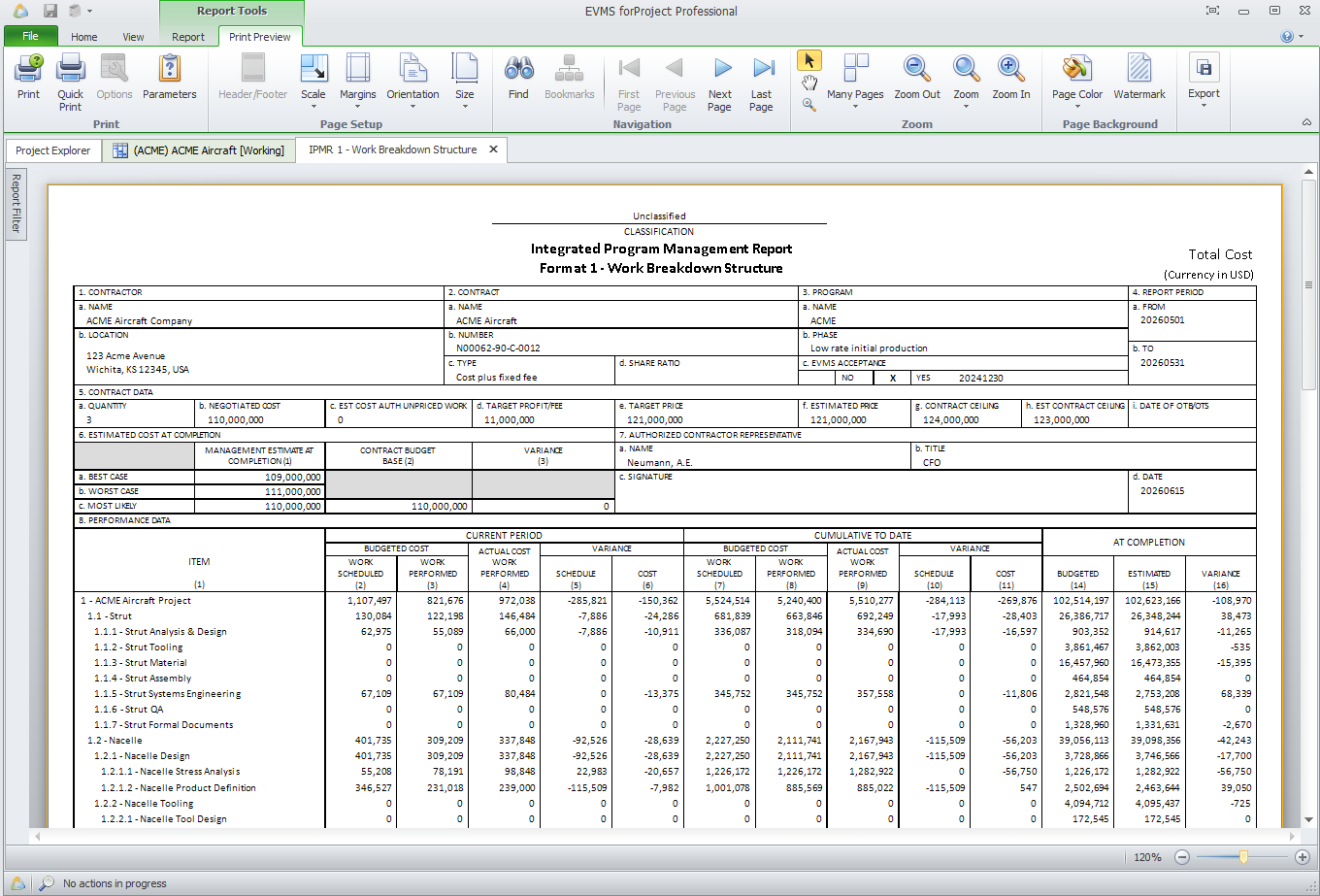
Most EVM tools produce only the Contract Performance Dataset. EVMS forProject produces both datasets in one run.
How it works
When you run the report, EVMS forProject reads your Microsoft Project, Project Server or P6 schedule and combines it with the cost data it already holds. You get the CPD and the SPD in the required JSON format, built from the same data, so they match. No separate SPD tool, no reconciling.
All 22 DOE PARS datasets at once
Most EVM tools cover only part of PARS. EVMS forProject produces the cost, schedule and supplemental datasets together.
How it works
Schedule data is read directly from Primavera P6 when you run the export. Supplemental data can be loaded from Excel, and built-in validations catch common PARS data issues before you submit.
One optimized export to Empower
Your earned value data and schedule detail in one package, ready for Empower, from Encore Analytics.
How it works
The Empower export sends your earned value data by WBS, OBS and up to 12 more structures, with Units, elements of cost and custom fields, and adds task-level schedule detail from Microsoft Project or P6. Over 100 validations run on the way, and you can write the file to Empower’s watch folder. It works for smaller projects with no formal EV requirement, too.
Schedule data straight from the source
Unlike other EVM tools, EVMS forProject pulls schedule data directly from Microsoft Project, Project Server or Primavera P6 EPPM.
How it works
Configurable import maps match your schedule fields to EVMS forProject, so each schedule can be set up its own way. Review Changes shows what changed since the last import before you accept it. Fewer steps, faster updates and fewer errors.
Every number on screen
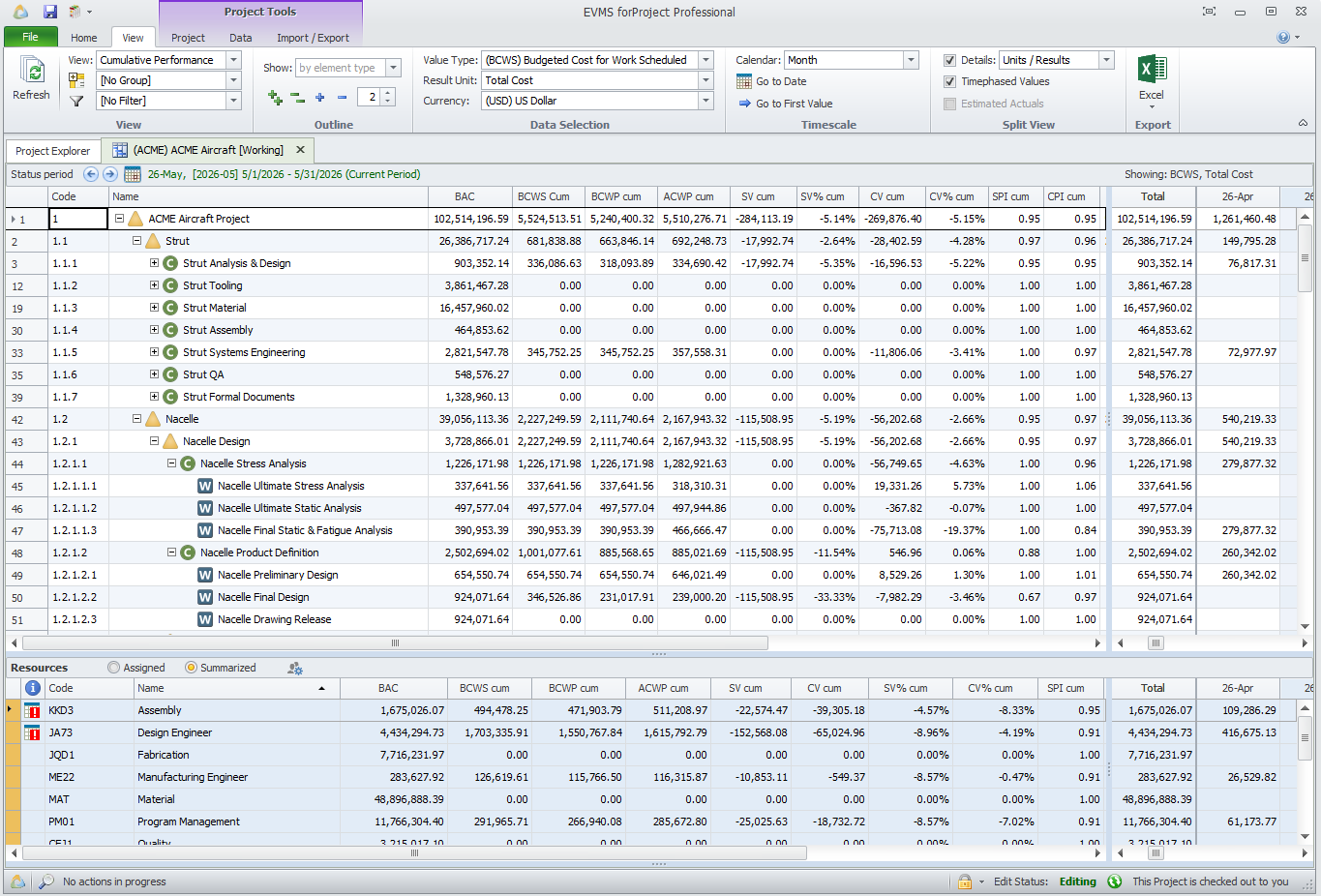
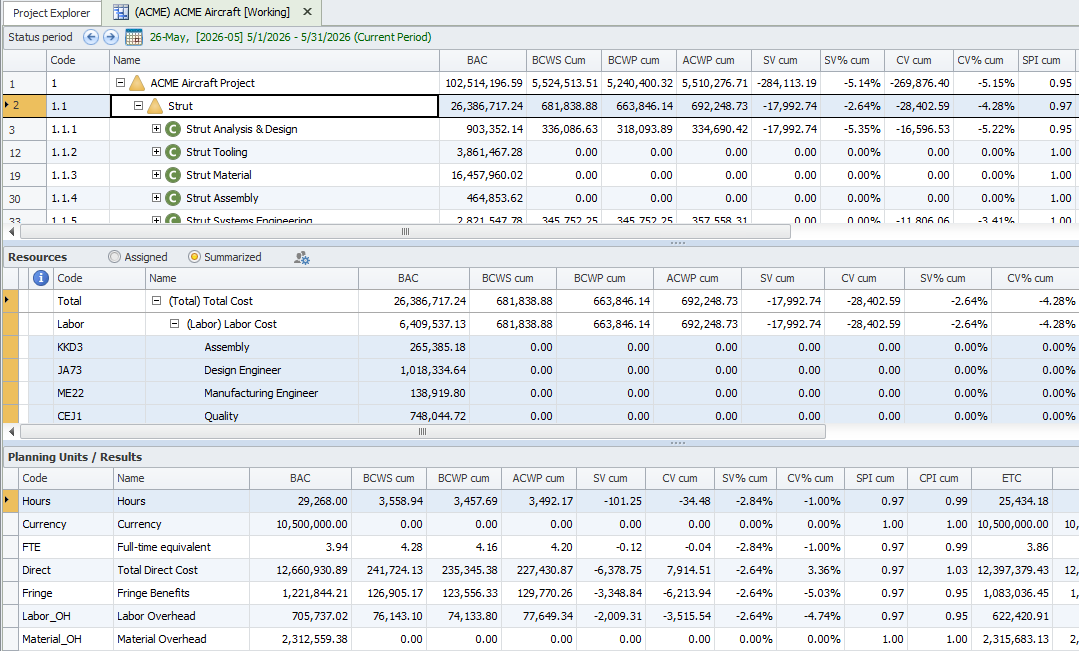
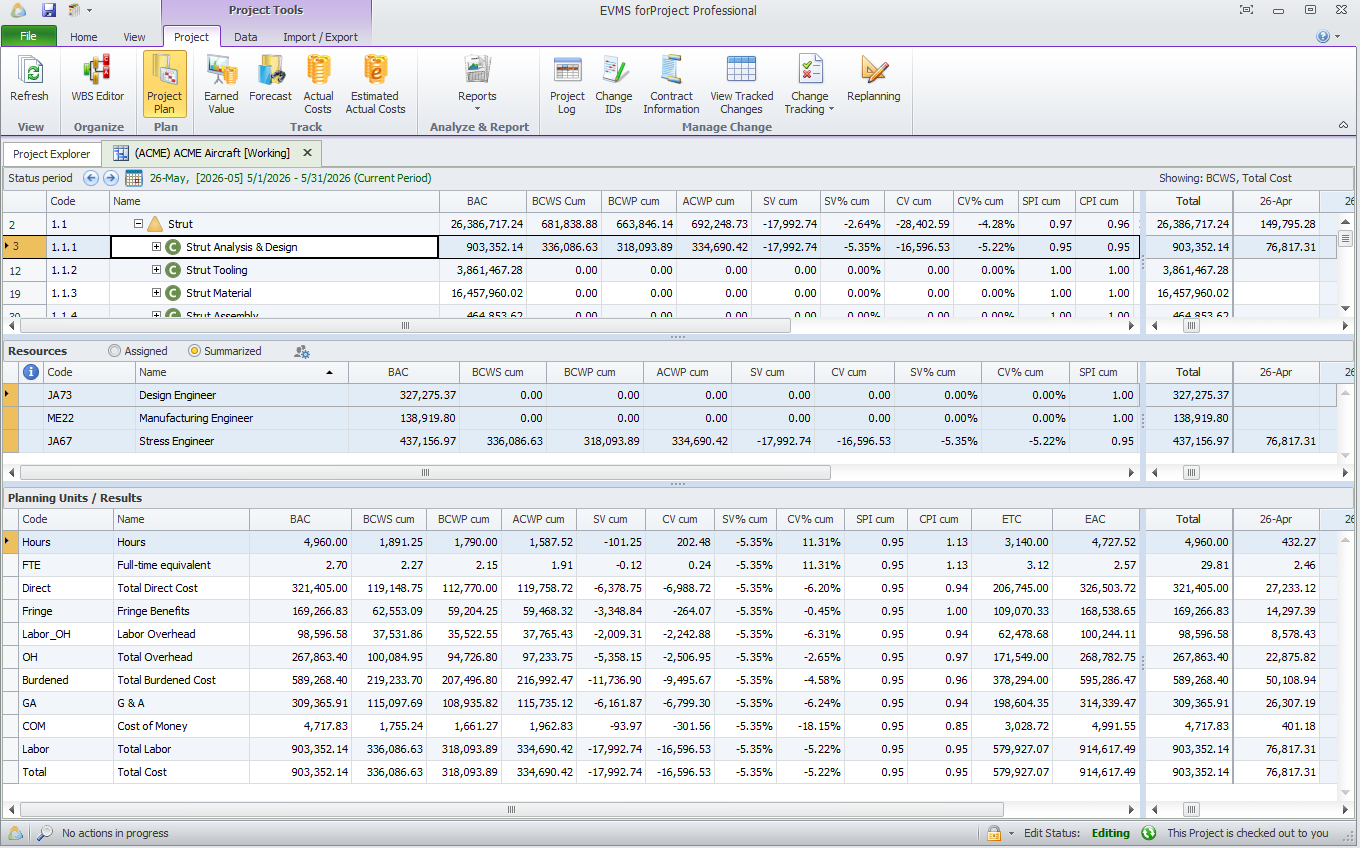
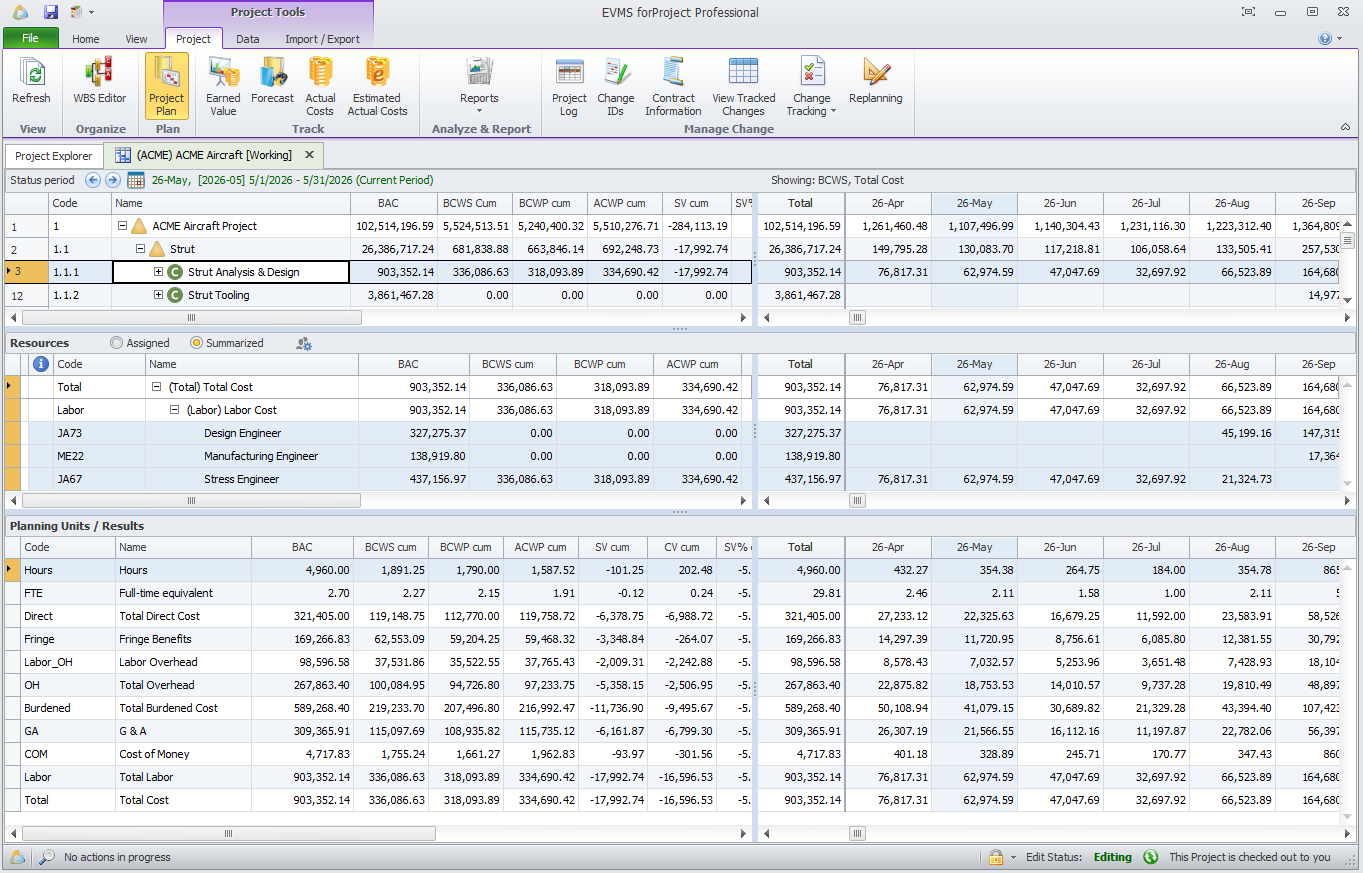
See all your performance data at every level of detail, without exporting to Excel.
How it works
Group, summarize, drill down, filter and save your own views, with more than 50 earned value metrics. Show results in any unit, from hours and direct cost to fully loaded cost, cumulative or time-phased, with detail by resource and by element of direct and indirect cost.
A data warehouse for Power BI
Publish your earned value data to a SQL data warehouse and build your own dashboards.
How it works
The EVMS forProject Data Warehouse holds EV metrics and time-phased values at every level, from the project summary down to tasks and resources, ready for Power BI, Power Query and other BI tools.
Your earned value data in Empower, checked on the way
Empower is a browser-based tool for analyzing earned value, schedule and other project performance data. Contractors use it, and so do multiple government agencies: DoD/DoW agencies, NASA and DOE, to name a few.
EVMS forProject exports your earned value data straight to Empower in its own optimized format: budgets, earned value, actuals and forecasts by WBS, OBS and up to 12 more structures, with your Units, elements of cost and custom fields. Task-level schedule detail from Microsoft Project or P6 goes in the same package. It works even for small projects with no formal EV requirement.
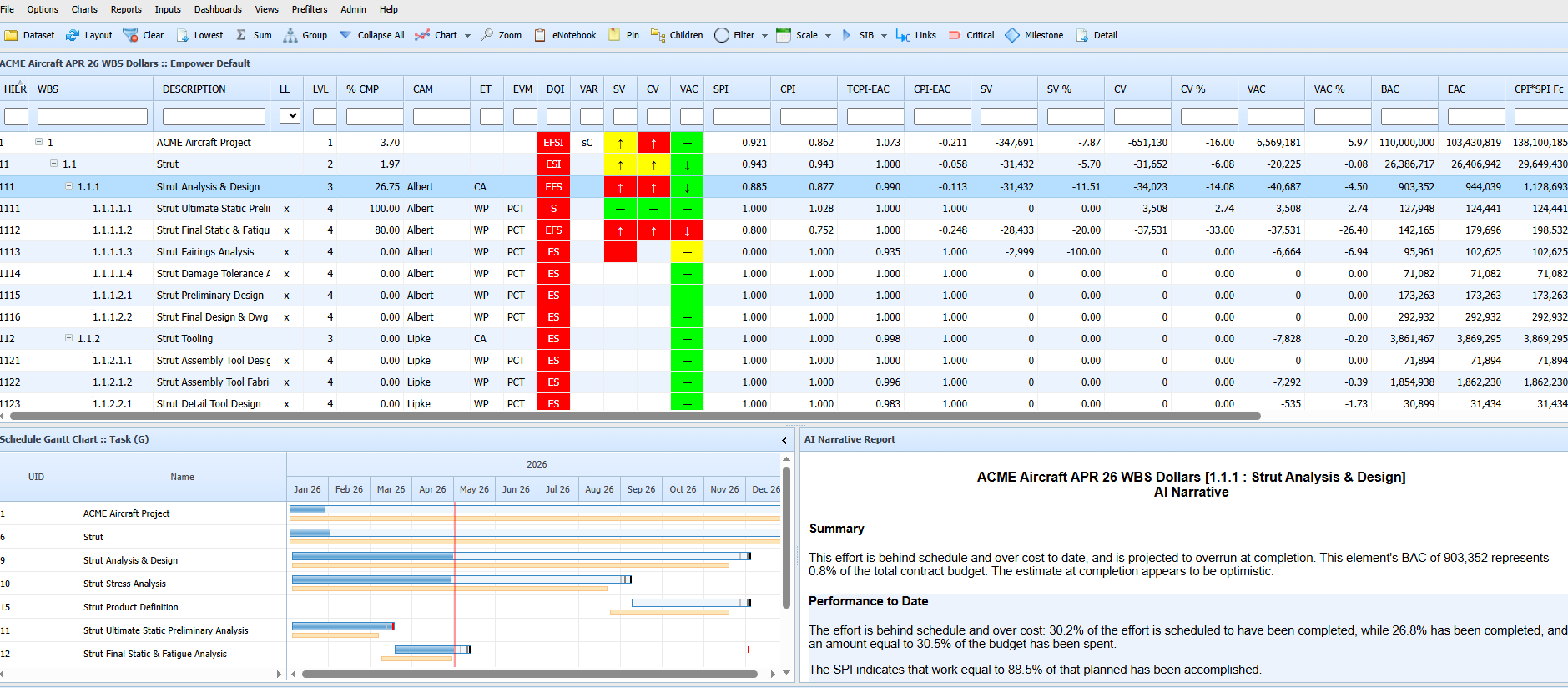
Empower, from Encore Analytics, with sample project data
How the Empower export works
EVMS forProject exports your earned value data and adds task-level schedule detail from Microsoft Project or P6 during the export. Everything leaves as one validated package.
- Over 100 validations before import
- Write the file to Empower’s watch folder if you like
- More structures, Units and elements of cost than IPMR, IPMDAR or PARS formats allow
See your data your way
Everything is on screen, at every level of detail.
What customers say
“The EVMS forProject software proved to be exactly what we were looking for. The software easily integrates with our existing financial systems. It is robust and powerful, and very intuitive to use. The support we received from forProject during and after implementation is the real difference-maker. …”Eric C., Chief Operating and Financial Officer
“We have been working with forProject since 2015. They told us early on, ‘We succeed when you succeed,’ and they have demonstrated that commitment to us every year since. forProject has a great product, outstanding customer service, and the most user-focused features of any of the products I have used in an Earned Value Management System.”Clare D., Earned Value & Financial Analyst
Why customers choose forProject
Easy to learn and use
An Office-style ribbon laid out to follow the EVMS process, so new users find their way quickly.
Built-in integration
Direct schedule integration, plus actual costs from Costpoint, Unanet, SAP, Oracle and others through Excel or flat-file import, or optionally Integrator forProject.
Configurable and scalable
Set it up to match your business rules, from simple performance measurement to supporting a full, formal EVMS process.
Responsive, expert support
A US-based team that responds within one business day, and product updates three to four times a year.
Reporting
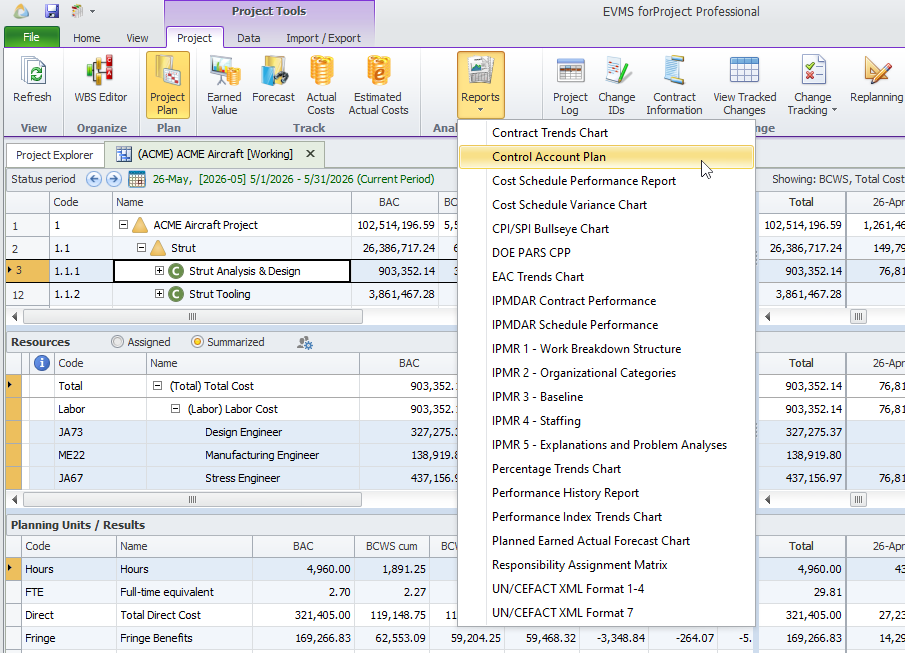
- IPMDAR Contract and Schedule Performance Datasets (JSON)
- IPMR in UN/CEFACT XML, for contracts still on the older specification
- DOE PARS CPP in JSON, all 22 datasets, with schedule data from P6
- 20+ built-in reports and charts, with templates and batch reporting
- Configurable export to Excel
- Data Warehouse for Power BI and other BI tools
See the full feature list
- WBS, OBS and CLIN, plus up to 10 custom structures per project
- Unlimited custom fields
- Configurable EV methods
- Configurable rate calculations
- Multi-currency with exchange rates
- Project budget log (NCC, AUW, MR, UB, PMB, OTB and more)
- Baseline freeze period control
- Single-point adjustments to cost and schedule variances
- Detailed change tracking log
- Estimated actuals
- Transaction import from Excel
- Review Changes after each import
- Advanced ETC and EAC forecasting methods
- 10 parametric independent EACs
- Management EAC vs. latest revised estimate (LRE)
- Project versions and version comparisons
- Periodic snapshots for history and trend reports
- Prior period comparison fields
- Plan to Target Value
- Fast backup and restore
Switching from another tool?
Customers have moved to EVMS forProject from Deltek Cobra, MPM, Artemis and others. Our consultants plan the migration with you, bring your data over and train your team.
Comparing with Cobra? See EVMS forProject as a Deltek Cobra alternative.
Implementation, training and support
Implementation
Planning, installation, configuration, integration, data migration and pilot support.
Training
Instructor-led, hands-on training on EVMS forProject and on earned value methods.
Support
A US-based team by phone, email or support portal, with a response within one business day.
Frequently asked questions
Can we get a trial version of EVMS forProject to try out?
No. Schedule Analyzer forProject has a free trial, but EVMS forProject is a server-based system, not a desktop tool. It needs setup with your IT team, plus configuration planned with your finance and project controls teams, before you can enter data. It also takes training to use well. We want new users to have a good, productive experience, so we offer in-depth demos instead, and in some cases a paid pilot implementation.
Is EVMS forProject hosted in the cloud? Where does our data live?
No, EVMS forProject isn’t a hosted service, and forProject doesn’t hold your data. You choose where to deploy it: on-premise on your own servers, or in the cloud environment of your choice (e.g., AWS or Azure). Your data stays wherever you decide to host it.
Does it work with Microsoft Project and Primavera P6?
Yes. EVMS forProject integrates directly with Microsoft Project, Project Server and Primavera P6, so you keep scheduling in the tool you already use.
Do I need a formal EVM requirement to benefit?
No. Many organizations use earned value simply to see cost and schedule performance clearly and forecast results earlier. EVMS forProject can scale from small, simplified EVM all the way up to full, formal EVMS reporting.
How does it get actual cost data?
Most customers use configurable Excel or flat-file import. Automated integration with systems such as Unanet, Deltek Costpoint, SAP and Oracle is also available through Integrator forProject (optional).
Does EVMS forProject produce IPMDAR and DOE PARS JSON files?
Yes. EVMS forProject produces IPMDAR data and DOE PARS CPP output in the required JSON formats, and IPMR data in UN/CEFACT XML for contracts still on the older specification.
See it with your own schedules
The best way to judge EVMS forProject is to see it working with data like yours.
Comparing options? See how EVMS forProject compares with Deltek Cobra.